Siding Design Studio
See your house with new siding
Upload a photo of your house, choose a vinyl siding style, siding color, and trim color, and compare up to 3design concepts against your own photo. It's free, your photo stays private, and it is deleted after 90 days.
Step 1 of 8
Get started
Upload a photo of the front of your house, choose a vinyl siding style, siding color, and trim color, and the studio creates up to 3 design concepts you can compare side by side with your photo.
Concepts are approximate. Use them to narrow down colors and styles, then look at real samples on your house before you decide.
Tips for a good photo
- Stand back far enough to fit the whole front of the house, including the roofline.
- Face the house straight on, holding the phone level.
- Shoot in daylight; an overcast day gives the most even color.
- Avoid cars, trees, or people blocking the walls.
- JPEG, PNG, or WebP, up to 10 MB and at least 800 × 600 pixels.
How it works
From photo to concept in five steps
- 01
Upload a photo
Take or choose a straight-on daytime photo of the front of the house.
- 02
Crop and straighten
Trim the edges and level the walls. The photo is resized in your browser before upload.
- 03
Choose siding and trim
Pick lap, Dutch lap, or board-and-batten vinyl, a siding color, a trim color, and an optional shake accent on the gables.
- 04
Compare concepts
Generate up to 3 concepts and compare each with your photo using a slider or side by side.
- 05
Save or request an estimate
Get a private link, download the images, or send them to Buckeye with an estimate request.
Privacy and retention
Your photo stays private
- Nothing is uploaded until you check the permission box.
- The photo is re-encoded on upload, which removes location (GPS) and other camera data.
- Photos and concepts are kept in private storage. They are only viewable through links that include your design's private key, and those pages are hidden from search engines.
- To create each concept, the photo is sent to OpenAI's image service. OpenAI states that API data is not used to train its models by default and may be kept for up to 30 days to run the service and detect abuse.[1]
- Everything is deleted automatically after 90 days unless you attach the design to an estimate request, in which case it is kept with your request.
- You can delete your photo and concepts yourself at any time from the last step.
Limitations
What a concept can't tell you
Design concept. Colors, textures, and proportions are approximate.
- Concepts are generated by an image model. Colors, textures, siding exposure, and proportions are approximate and can differ from installed products.
- The model can occasionally change things it was told to keep, such as window shapes or landscaping. Treat anything other than the siding and trim as unreliable.
- Concepts don't account for the condition of the wood underneath, the trim details your house needs, or which colors are in stock.
- Only the vinyl siding styles listed are offered. The studio doesn't show fiber cement, wood, or other materials Buckeye doesn't install.
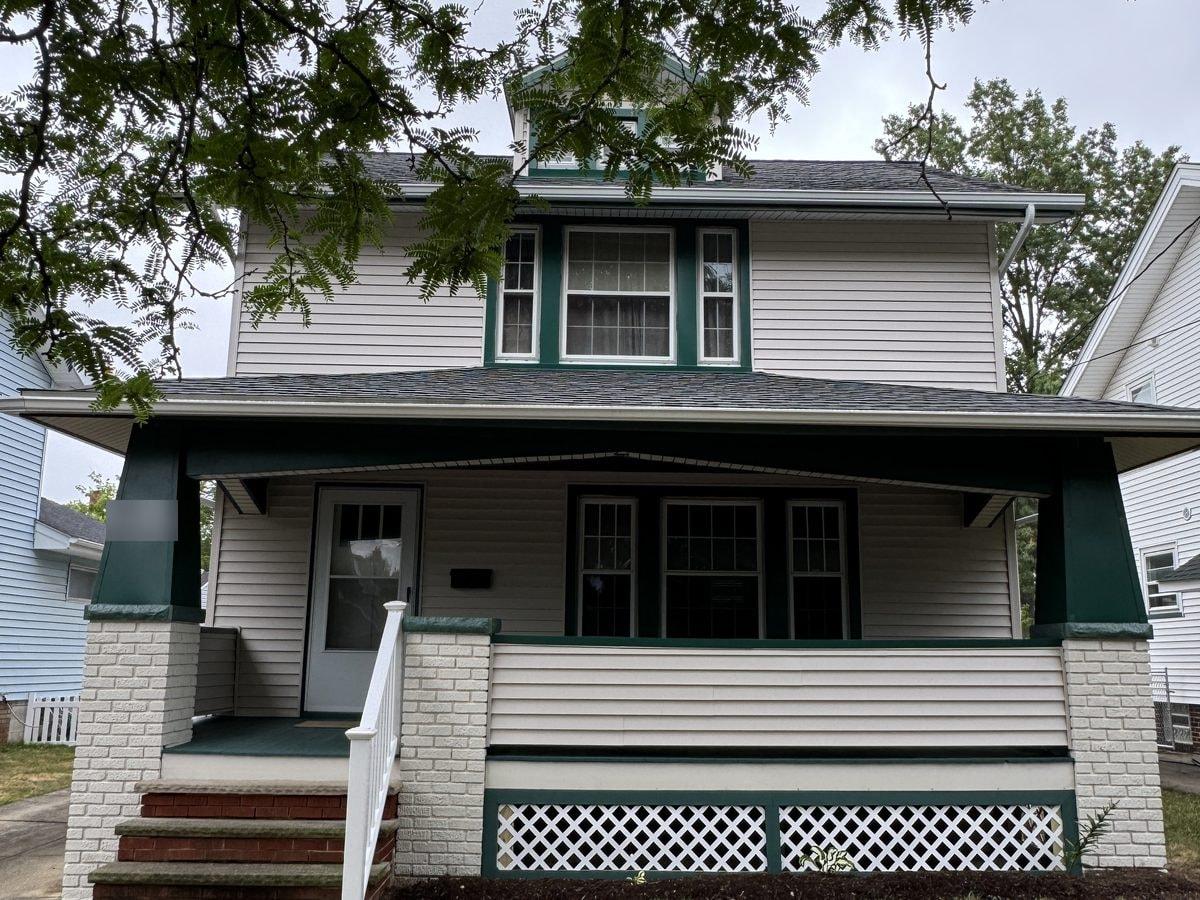
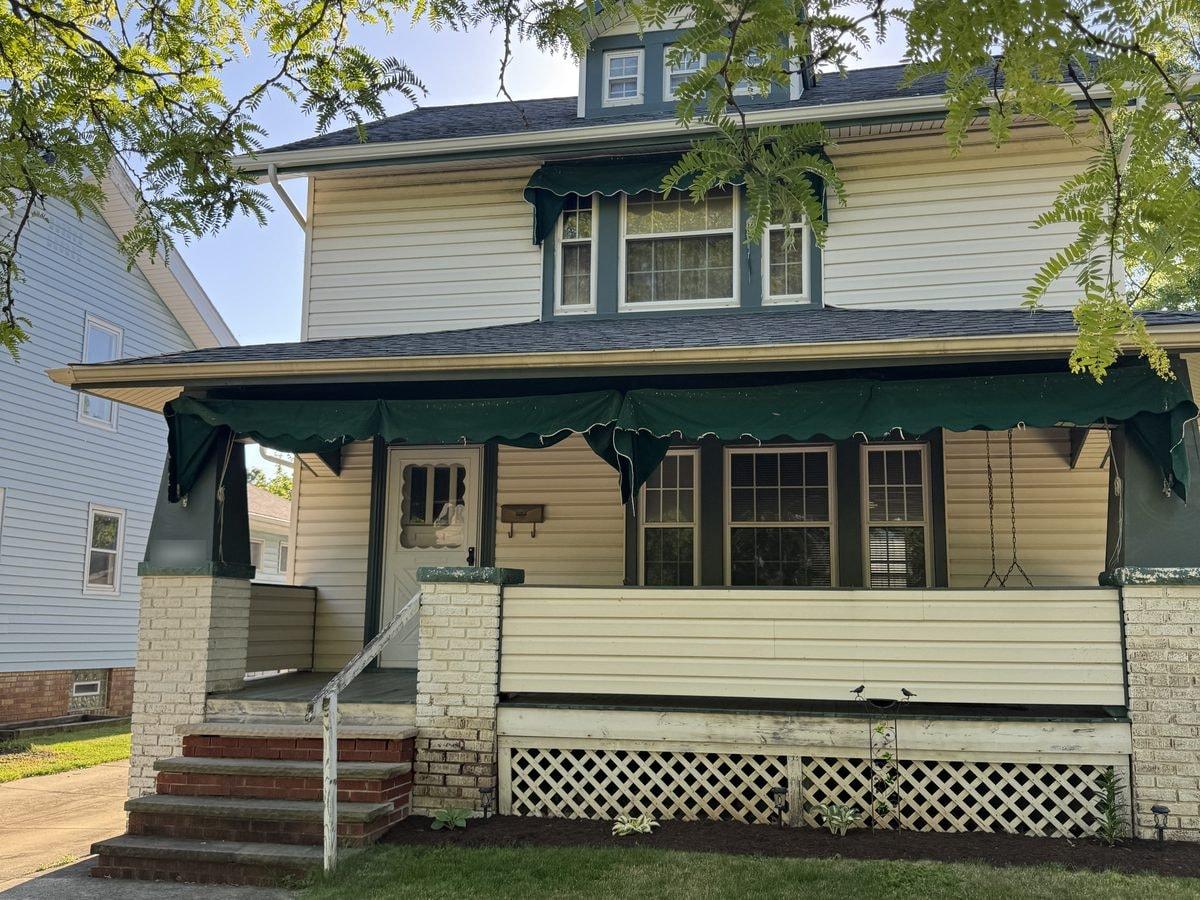
Real project · Lakewood
AI-Rendered Siding Design
The homeowner was unsure which colors would suit the house.
The renderings let the homeowner compare options before committing, and the final design pairs bright white siding with dark green trim and porch accents.
The photos show the house before and after installation. The renderings Buckeye made for this homeowner were prepared separately from this studio.
Read the projectDesign Studio
Frequently asked questions
Is the Design Studio free to use?
Yes. You can upload a photo and create up to 3 concepts without giving us your name, phone number, or email. Requesting an estimate afterward is optional.
How accurate are the design concepts?
They are approximate. The image model repaints the siding and trim on your photo, and colors shift with screen settings, the light in your photo, and the model itself. Use the concepts to narrow down a direction, then compare real siding and trim samples on your house before ordering.
Why are the colors named generically instead of by brand?
Every siding manufacturer has its own palette and names, and they change. The studio uses plain color descriptions so a concept doesn't suggest a specific product. When we write an estimate, we match the look you like to colors that are actually available.
What happens to my photo?
It is stored privately, with location data removed, and is only viewable through links that carry your design's private key. It is deleted automatically after 90 days unless you attach it to an estimate request, and you can delete it yourself at any time from the last step of the studio.
Why can I only make three concepts per photo?
Each concept takes real computing time to generate, so the limit keeps the studio available for everyone. If you want to try more combinations, start over with the same or a different photo.
Can Buckeye make renderings for me instead?
Yes. Buckeye offers free design renderings before you commit; a Lakewood homeowner who was unsure about colors used them to compare options before choosing white siding with dark green trim. Ask for renderings when you request an estimate.
Free estimate
Get a free siding estimate.
Tell us about the house and we will schedule a time to measure, inspect the trim and wood underneath, and write up the options.
Sources
- 1.Enterprise privacy at OpenAI, OpenAI (updated January 8, 2026). Accessed Nov 17, 2026.API inputs and outputs are not used for training by default and may be retained up to 30 days to provide the service and identify abuse.